Introducing Eenos 5: A New Generation of Web Hosting Management
Powerful hosting migrations, complete WordPress management, advanced email infrastructure, redesigned DNS administration, and smarter hosting automation.
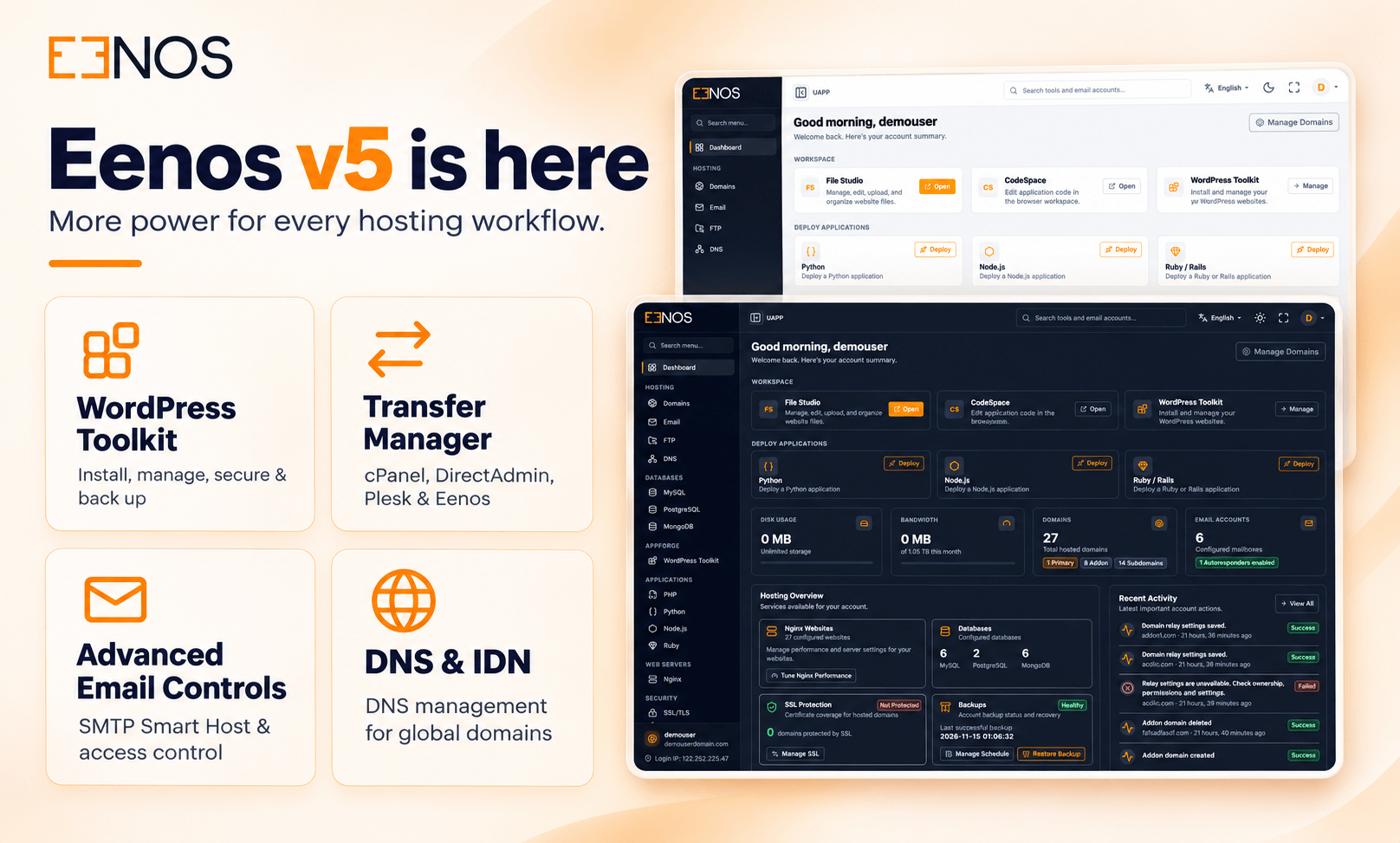
We are excited to introduce Eenos 5, a major milestone in the evolution of the Eenos web hosting control panel. This release brings an extensive collection of new features, improvements, and management tools designed to simplify Linux server administration and modern web hosting operations.
Eenos 5 introduces a comprehensive multi-panel Transfer Manager, a fully integrated WordPress Toolkit, a redesigned DNS Manager, advanced SMTP security controls, email delivery tracking, outbound email sending limits, and expanded CloudLinux integration.
These enhancements go beyond everyday hosting administration. They provide hosting providers, server administrators, resellers, and website owners with greater control over their infrastructure, applications, email services, and hosting resources.
Let's explore the major features and improvements that make Eenos 5 a significant release.
1. Introducing the New Eenos Transfer Manager
Migrating websites and hosting accounts between control panels is often one of the most challenging tasks for hosting administrators. Eenos 5 introduces a new Transfer Manager designed to streamline this process through a unified migration interface.
Migration Support for Multiple Hosting Control Panels
The Transfer Manager supports migrations from four hosting environments:
- cPanel/WHM: Migrate supported hosting accounts, packages, reseller structures, websites, databases, email data, and DNS configurations from cPanel servers.
- DirectAdmin: Transfer supported DirectAdmin hosting accounts, reseller data, packages, website files, databases, email configurations, and DNS records.
- Plesk: Migrate supported Plesk subscriptions, service plans, reseller/customer ownership structures, website content, databases, and email components.
- Eenos: Move supported hosting accounts and packages between Eenos servers using the native backup and restoration system.
Each platform has a dedicated migration wizard that helps administrators connect to the source server, discover available hosting packages and accounts, select migration targets, and review configuration options.
Parallel Migration and Live Progress
Eenos 5 supports parallel transfer and restoration through separate worker pools with resource-based limits. This allows multiple eligible accounts to be processed concurrently while maintaining account dependencies and restoration order.
The Transfer Manager also includes a live monitoring interface displaying migration stages, account progress, package results, warnings, and operation logs.
Migration tasks continue running in the background even when the administrator closes the browser.
Safer Migration Operations
The migration system includes destination conflict detection, secure SSH connectivity, task isolation, staging cleanup, and detailed reporting.
Supported migration workflows can also update matching DNS addresses on the source server after successful account restoration.
By bringing these capabilities together, Eenos 5 makes server consolidation and migration from existing hosting platforms more manageable.
2. Introducing the Eenos WordPress Toolkit
One of the major additions in Eenos 5 is the WordPress Toolkit, integrated directly into the hosting user control panel through AppForge.
WordPress powers websites ranging from personal blogs to business portals and online stores. Managing WordPress installations, plugins, themes, updates, and backups often requires several administrative tools.
The new WordPress Toolkit brings these essential operations together in one interface, helping website owners manage their WordPress environments without constantly switching between the hosting control panel and WordPress administration.
One-Click WordPress Installation
Eenos 5 introduces a guided WordPress installation workflow that simplifies deploying new WordPress websites.
Users can select an existing hosting domain or create a new subdomain, choose a compatible PHP version, configure the website title and administrator credentials, and select the WordPress installation language.
The installation workflow supports:
- WordPress installation in the selected domain's document root.
- Automatic creation of a new subdomain where supported.
- WordPress language selection.
- PHP version selection.
- Automatically generated administrator passwords.
- WordPress core, plugin, and theme automatic-update preferences.
- Database creation and configuration.
- Automatic website configuration and virtual-host updates.
Live WordPress Installation Progress
WordPress installation is handled through background jobs, allowing users to monitor the deployment process.
The progress interface displays the current installation stage, including package preparation, database setup, WordPress configuration, verification, and website publication.
Users receive clear completion or error messages and can access their installation after deployment succeeds.
My Installations — Centralized WordPress Management
The My Installations interface provides a centralized overview of WordPress websites associated with a hosting account.
Users can switch between card and list layouts, search installations, apply filters, and review installation information.
The interface provides access to website management actions, WordPress administration, status refresh, and other supported operations.
This makes it easier to manage multiple WordPress websites from one hosting account.
Discover Existing WordPress Installations
Eenos 5 also introduces Discover WordPress, allowing users to locate supported existing WordPress installations that were created outside the Toolkit.
The discovery process scans eligible account-owned document roots and identifies installations that can be registered with the management system.
Users can review discovered websites and select which installations to import.
This is particularly useful for website owners migrating to Eenos or bringing existing WordPress websites under centralized management.
WordPress Core Update Management
Keeping WordPress up to date is an important part of website maintenance.
The Toolkit provides WordPress core version information, update availability, and controlled upgrade operations.
Users can review available updates, confirm an upgrade, and follow the progress of background update jobs.
The Toolkit also includes configurable automatic-update policies, allowing website owners to select supported core update behavior.
Complete WordPress Plugin Management
The new WordPress Plugin Manager provides convenient access to installed plugins and supported plugin operations.
Users can:
- View installed plugins and their current versions.
- Search for plugins from WordPress.org.
- Install new plugins.
- Activate or deactivate plugins.
- Update individual plugins or selected groups.
- Configure automatic plugin updates.
- Delete supported plugins after confirmation.
Plugin operations are processed through controlled background tasks with dependency and compatibility checks.
The system also distinguishes plugin types that should not be modified through ordinary plugin-management operations, including supported must-use, drop-in, and network-managed cases.
WordPress Theme Management
Eenos 5 expands WordPress management with a dedicated Themes section.
Website owners can inspect installed themes, manage supported theme operations, review update availability, and configure automatic-update settings.
This helps simplify routine website maintenance without requiring users to perform every operation manually through the WordPress dashboard.
WordPress Security Management
Security is a central part of the WordPress Toolkit.
The dedicated Security section brings multiple website protection and administration features together.
WP-Admin Access Protection
Users can configure additional access protection for WordPress administration through an interface that supports Apache and Nginx hosting environments.
Administrator Security
The Toolkit includes WordPress administrator management features, administrator password changes, and confirmed session revocation.
Integrity and Configuration Checks
Supported integrity checks help users review WordPress core files and identify configuration concerns.
Authentication-Key Management
Users can regenerate WordPress authentication keys through a controlled operation.
Web Server Protection
The Toolkit includes supported web-server security controls and configuration protection options.
These capabilities provide website owners with more visibility and control over important WordPress security settings.
WordPress Backup and Restore
Eenos 5 introduces dedicated WordPress backup management within the Toolkit.
Users can create backups of their WordPress websites and associated databases, monitor backup progress, and review available backup archives.
Backups are stored within a private directory under the hosting account and can be accessed through supported download and FileStudio workflows.
The Toolkit also supports restoring compatible backups through background operations.
WordPress Settings and Maintenance Tools
The Toolkit includes dedicated Settings and Tools sections for supported website configuration and maintenance tasks.
Users can review WordPress settings, update policies, installation details, PHP selection, and supported maintenance or debugging controls.
With installation, discovery, updates, plugins, themes, security, and backups integrated into the hosting panel, Eenos 5 provides a comprehensive environment for everyday WordPress management.
3. Redesigned DNS Manager v2
Eenos 5 introduces a redesigned DNS management system across the administrator, reseller, and hosting user panels.
The new DNS Manager v2 provides a responsive interface, individual DNS record operations, improved validation, and more flexible zone management.
Support for 20 DNS Record Types
The administrator and reseller interfaces support 20 DNS record types, including A, AAAA, CAA, CNAME, MX, NS, PTR, SOA, SRV, TXT, TLSA, HTTPS, and SVCB records.
Hosting users can manage 19 supported types, with SOA administration reserved for privileged management.
Easier DNS Record Management
Instead of replacing an entire zone for routine edits, users can create, modify, and remove individual DNS records.
The interface provides searchable records, type filters, record-specific inputs, validation messages, and convenient clipboard actions.
Email Authentication Records
DNS Manager v2 also improves the administration of SPF, DKIM, and DMARC records.
These policies can be configured during zone creation and managed through supported DNS settings.
DNS Templates and Deployment Protection
Administrators and resellers can work with supported DNS templates, manage zone configuration, and download DNS zones.
Backend validation detects conflicting records and other invalid configurations before deployment.
The system includes staged configuration validation and rollback support to help protect existing DNS services when an update fails.
4. Advanced Email Management in Eenos 5
Email hosting is an important part of the Eenos platform, and Version 5 introduces extensive improvements across SMTP administration, security, outbound message routing, delivery monitoring, and sending limits.
The enhanced email management tools are designed to give hosting providers greater control over mail infrastructure while providing website owners with improved visibility into their email services.
SMTP Access Control — A Centralized Security Dashboard
Eenos 5 introduces a dedicated SMTP Access Control interface in the administrator panel.
The dashboard provides centralized management of seven SMTP access-control categories.
Blacklisted SMTP IPs
Administrators can maintain lists of blocked IP addresses and CIDR networks. Matching connections are blocked according to the configured Exim connection policies.
Trusted SMTP IPs
Trusted sources can receive defined exemptions from selected verification and content-scanning checks.
Relay authorization remains protected, and trusted-source status does not automatically permit unauthenticated external mail relay.
Sender Verification Bypass
Selected sources can bypass sender verification and callout checks while other applicable SMTP security policies remain active.
Only Verify Recipient
This policy allows selected sources to bypass specified sender, reputation, and content checks while retaining recipient verification and relay protection.
Backup MX Hosts
Administrators can define recognized backup MX hosts and apply the corresponding connection-rate-limit exceptions.
Blocked Sender Domains
Specific sender domains and supported wildcard subdomain patterns can be blocked through envelope-sender policies.
Blocked Countries
Administrators can restrict SMTP connections based on source IP networks associated with selected countries.
Country-Based SMTP Blocking
The country-blocking interface supports 240 installed country/code datasets.
Administrators can search for countries, select the required locations, and generate combined IPv4 and IPv6 blocklists from locally installed IPdeny data.
The interface also provides saved selection counts, generated range information, and dataset status details.
This gives hosting administrators an additional layer of configurable SMTP connection control.
Improved SMTP Command Limits and Transaction Delays
Eenos 5 introduces more granular control over SMTP protocol behavior.
Administrators can configure limits for unknown SMTP commands, syntax/protocol errors, and non-mail SMTP commands.
The release also introduces independently configurable SMTP greeting delays and recipient delays.
These controls provide additional flexibility for managing SMTP connection behavior and applying server-level mail policies.
Enhanced Spam and DKIM Handling
The updated Exim integration includes refinements to spam-score calculations, rejection thresholds, scanner-error handling, and message subject prefixes.
DKIM verification reporting has also been improved so successful verification status is only recorded when a signature passes the relevant check.
These improvements provide clearer mail security behavior and more accurate administrative feedback.
5. SMTP Smart Host — Flexible Outbound Email Delivery
Eenos 5 introduces SMTP Smart Host management, expanding how outbound email can be routed through external SMTP providers.
A Smart Host acts as an outbound relay, allowing mail to be submitted through a configured external SMTP server instead of relying exclusively on direct delivery from the hosting server.
Global SMTP Smart Host
Administrators can configure a global outbound SMTP relay through the Eenos control panel.
The configuration supports relay hostnames or IP addresses, ports, supported TLS modes, SMTP authentication, and provider-authorized connections.
The interface also includes connection testing and an explicit test-email submission option.
Per-Domain SMTP Smart Host
Eenos 5 extends this capability with domain-specific SMTP relay configurations.
Individual supported hosting domains can use their own relay settings instead of relying entirely on the global SMTP policy.
This allows hosting providers to accommodate customers who use different external email delivery services.
SMTP Smart Host in the Hosting User Panel
The hosting user control panel includes a dedicated SMTP Smart Host management page for supported account domains.
Users with the required permissions can view their domain relay configurations, manage supported settings, test relay connectivity, and enable, disable, or remove saved configurations.
The interface distinguishes between the saved relay configuration and the effective delivery policy.
Disabled configurations can retain their credentials and connection settings for later reuse.
Protected SMTP Credentials and TLS Connections
SMTP Smart Host management includes protected credential storage and controls designed to avoid exposing saved passwords in ordinary configuration views.
Relay connections support authenticated SMTP and TLS certificate verification.
Configured relay failures are handled through the normal mail retry behavior rather than silently switching to an unintended delivery route.
With global and domain-specific relay management, Eenos 5 offers hosting providers greater flexibility when integrating external email delivery infrastructure.
6. Email Sending Limits — Better Outbound Email Control
Eenos 5 introduces an enhanced Email Sending Limits system for managing outgoing email activity.
Hosting providers can establish sending policies at different levels of their infrastructure.
Multi-Level Sending Limit Policies
Sending limits can be defined through:
- Global Exim settings.
- Hosting package configurations.
- Individual hosting account settings.
- Domain-specific overrides.
The policy system applies the applicable limits while allowing supported child configurations to inherit parent restrictions.
Hourly Outgoing Recipient Limits
Administrators can configure the maximum number of unique external envelope recipients that a verified sending domain may address during a rolling one-hour period.
The system includes accounting designed to handle simultaneous submissions and avoid counting ordinary delivery retries as additional accepted recipients.
Failed and Deferred Delivery Restrictions
Eenos 5 also supports restrictions based on configured failed/deferred delivery percentages.
These policies use recorded delivery outcomes and account for applicable infrastructure-related deferrals.
This helps administrators identify and restrict sending activity that exceeds configured failure thresholds.
Email Sending Statistics
The administrator interface provides domain-level reporting for:
- Effective sending limits.
- Accepted and reserved recipient usage.
- Remaining allowance.
- Delivered, failed, and deferred outcomes.
- Delivery failure percentages.
- Current restriction status.
The interface uses searchable tables and management dialogs for reviewing and adjusting domain policies.
These capabilities give hosting administrators more control over outbound email activity across shared hosting environments.
7. MailTrack — Email Delivery Tracking and History
Eenos 5 introduces MailTrack, a dedicated system for collecting and presenting email delivery history.
MailTrack processes supported Exim log events and maintains structured delivery records for administrative reporting.
Email Delivery Tracking for Administrators
The administrator panel includes a searchable Email Delivery Tracking interface.
Administrators can inspect recorded email submissions, delivery attempts, retry activity, failures, and completed outcomes.
Filters and date-range controls make it easier to locate relevant records.
Message and recipient timelines provide additional information for investigating delivery issues.
Email Delivery Tracking for Hosting Users
Eenos 5 also makes supported email delivery history available directly to hosting account users.
Users can inspect authorized outgoing email activity and incoming deliveries associated with their hosted mailboxes.
The interface displays recorded delivery outcomes, including:
Delivered: The recorded delivery attempt completed successfully.
Deferred: Delivery was temporarily delayed and may be retried.
Failed: A recorded delivery attempt encountered a failure.
Recipient-level timelines allow users to follow the progress of supported message delivery attempts.
Delivery Diagnostics and Historical Records
MailTrack can retain information such as message subjects, submission details, delivery timestamps, recipient outcomes, and supported delivery diagnostics when present in Exim logs.
The system does not collect email message bodies or passwords.
It includes protected account-level access controls, historical data retention, and administrative service management.
Why MailTrack Matters
Without detailed delivery reporting, investigating email problems can require direct server access and manual analysis of Exim logs.
MailTrack provides a more accessible interface for understanding recorded delivery activity.
For hosting providers, this can help simplify customer support and troubleshooting. For hosting customers, it provides clearer visibility into what happened to their email.
8. Internationalized Domain Name Support
Eenos 5 expands Internationalized Domain Name (IDN) support across supported hosting management workflows.
Users can work with domain names containing supported international characters while Eenos handles canonical Punycode conversion internally.
The integration covers supported domain administration, DNS operations, email management, SSL/TLS configuration, and account-related workflows.
This helps hosting providers serve customers who use multilingual domain names while maintaining consistent internal domain identification.
9. Expanded CloudLinux Integration
Eenos 5 includes additional CloudLinux resource-management features for supported hosting environments.
Administrators and resellers gain new package configuration controls for inode limits and MySQL Governor CPU and I/O resources.
The release also includes improvements to CageFS preferences and resource application during supported hosting account operations.
CloudLinux settings can be preserved and applied during relevant account modifications, package changes, and restoration workflows.
These enhancements help hosting providers configure and maintain account-level resource policies in CloudLinux environments.
10. Improved Backup, Restore, and Hosting Reliability
Eenos 5 also includes improvements to the underlying hosting management infrastructure.
Backup and restore operations provide more accurate failure reporting, particularly when website file synchronization encounters errors.
Account restoration includes refinements to file permissions, ownership handling, database authentication preservation, and background operation reporting.
Configuration validation and rollback behavior have also been improved across supported services.
Together, these changes strengthen the reliability of important administrative operations.
A Major Step Forward for Eenos
Eenos 5 brings together major improvements across website management, hosting migrations, DNS administration, email infrastructure, and server resource management.
The new Transfer Manager simplifies supported control-panel migrations. The WordPress Toolkit provides integrated website administration. DNS Manager v2 introduces more capable zone management, while SMTP Smart Host, Email Sending Limits, and MailTrack significantly expand email administration.
For hosting providers, these capabilities create new opportunities to consolidate management tasks and offer more services through a single control panel.
For resellers and website owners, Eenos 5 provides practical tools that make everyday hosting operations more accessible.
Discover What's New in Eenos 5
Eenos 5 represents a significant milestone in the development of the Eenos hosting control panel.
With its expanded feature set, redesigned management interfaces, and numerous reliability improvements, this release continues our commitment to delivering a powerful and practical Linux hosting management platform.
Explore Eenos 5, review the complete release notes, and discover how its new features can enhance your hosting environment.
Welcome to Eenos 5 — the next generation of web hosting management.