Migrate from cPanel, DirectAdmin and Plesk to Eenos with the Built-In Migration Wizard
Moving to a new hosting control panel should be an opportunity to improve your hosting environment, not a project that requires rebuilding every website and account manually.
For hosting providers, resellers, and server administrators, migrating from cPanel, DirectAdmin, or Plesk involves much more than transferring website files. Hosting packages, user accounts, databases, email configurations, DNS records, scheduled tasks, and account ownership must all be considered.
Eenos 5 introduces a built-in hosting migration interface designed to simplify this process.
With dedicated migration workflows for cPanel/WHM, DirectAdmin, and Plesk, administrators can connect to an existing hosting server, discover available accounts and packages, select what to migrate, and follow the transfer process through a unified management interface.
Whether you're planning to move a small collection of websites or migrate a server containing multiple hosting accounts, the Eenos migration system provides the tools to organize and monitor the process.
A Unified Migration Interface for Three Popular Hosting Control Panels
Every hosting control panel manages accounts, packages, permissions, and hosting services differently.
A cPanel hosting account does not have the same structure as a DirectAdmin user, and Plesk organizes hosting around subscriptions, service plans, and customer relationships.
Instead of treating every source system identically, Eenos provides dedicated migration workflows for:
- cPanel and WHM: Migrate hosting accounts, packages, reseller relationships, websites, databases, and supported email configurations.
- DirectAdmin: Transfer hosting users, reseller-owned accounts, packages, domain configurations, website content, and supported account settings.
- Plesk: Migrate subscriptions, supported hosting plans, websites, databases, and customer or reseller relationships.
Each workflow understands its source control panel's structure and prepares the selected data for restoration into Eenos.
The result is a consistent migration experience without overlooking the important differences between hosting platforms.
Get Started with a Guided Migration Wizard
One of the most useful features of the Eenos migration system is its guided web interface.
Instead of requiring administrators to manually prepare account archives and run individual restoration commands, the migration wizard breaks the process into manageable steps.
1. Connect to Your Existing Hosting Server
Begin by selecting your source control panel and connecting to the remote hosting server over SSH.
Eenos supports root SSH authentication using a password or a managed SSH key. Source SSH host-key detection and explicit fingerprint acceptance provide an additional identity-verification step before proceeding.
Once the connection is established, the migration system can discover the information needed to prepare the transfer.
2. Discover Hosting Packages and Accounts
After connecting to the source server, Eenos retrieves available hosting packages and accounts.
The interface presents this information in searchable, paginated tables, making it easier to find individual accounts or manage larger hosting environments.
Administrators can review account names, domains, package information, and available storage usage.
Importantly, package selection and account selection are independent.
You can import hosting packages without migrating accounts, migrate accounts without importing their source packages, or select both.
This flexibility is useful when preparing a new Eenos server before moving production websites.
3. Select the Accounts You Want to Migrate
Not every hosting migration needs to transfer an entire server.
Eenos allows administrators to choose specific hosting accounts and use bulk selection when migrating multiple accounts.
The migration interface also checks for conflicts involving existing usernames, domains, and destination packages.
Conflicting or unavailable items are identified before scheduling, helping administrators avoid accidentally replacing existing hosting data.
4. Review Your Migration Settings
Before starting the transfer, the migration wizard provides a summary of the selected packages, accounts, and migration options.
Available settings include:
- Destination IPv4 address and optional IPv6 address.
- Temporary staging location for migration files.
- Sequential or parallel account processing.
- Transfer and restoration worker limits.
- Migration inactivity timeout.
- Optional source DNS record updates after successful restoration.
Administrators can review the selections and remove unwanted items before starting the task.
5. Start the Migration and Monitor Progress
Once the configuration is ready, Eenos creates a migration task and starts its background transfer engine.
The migration continues independently of the browser session. Administrators can close the page and return later to inspect the task.
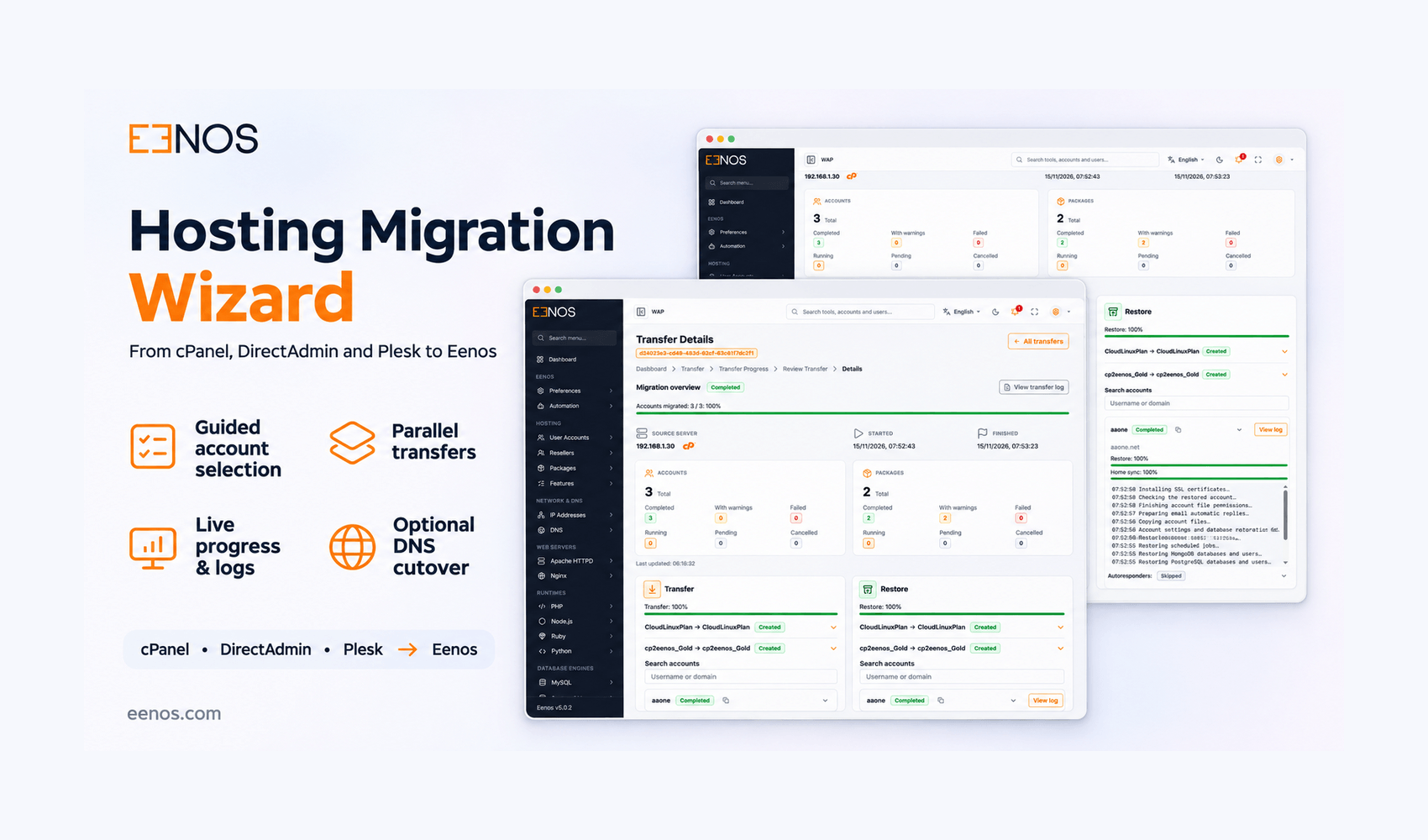
A shared progress interface makes it possible to track the transfer and restoration stages, identify completed accounts, and investigate warnings or failures.
Migrate from cPanel and WHM to Eenos
For hosting providers considering an alternative to cPanel, transferring existing customer accounts is one of the most important parts of adopting a new hosting platform.
Eenos includes a cPanel/WHM migration workflow designed to discover hosting accounts through WHM, convert supported configurations, and restore account data into the Eenos environment.
cPanel Account and Package Migration
The migration system discovers WHM packages and hosting accounts directly from the source server.
Supported package settings include disk quotas, bandwidth limits, database allocations, FTP accounts, email limits, domains, shell access, and other hosting resources.
Where available, supported CloudLinux resource settings can also be converted into compatible Eenos package values.
Website, Email and Database Migration
The cPanel migration process prepares an account backup containing the required hosting metadata, configuration, and supported database information.
Website and home-directory content is transferred separately using secure synchronization.
Supported account data includes:
- Website files and document roots.
- MySQL databases and supported authentication settings.
- Email accounts, forwarders, pipes, filters, and automatic replies.
- Additional domains, subdomains, and aliases.
- FTP accounts and scheduled cron jobs.
- Supported reseller and SSL metadata.
After the account metadata is restored, Eenos synchronizes the home-directory content and repairs relevant permissions and ownership settings.
An optional DNS update can also be performed on the source cPanel server after successful account verification.
Why this matters: Hosting administrators can migrate selected cPanel accounts through an organized interface while preserving supported hosting configurations without manually recreating every account.
Migrate from DirectAdmin to Eenos
DirectAdmin is another widely used hosting control panel, particularly among web hosting providers and server administrators.
Migrating from DirectAdmin requires understanding its account ownership, package configurations, backup archives, and document-root layout.
Eenos includes a dedicated DirectAdmin migration workflow to handle these differences.
DirectAdmin User and Reseller Migration
The migration wizard discovers DirectAdmin users, resellers, hosting packages, and domain information.
It also recognizes that package names may be associated with different source owners, helping prevent incorrect package mappings.
Supported package limits and optional CloudLinux settings are converted where applicable.
Full Account Backup and Restoration
For DirectAdmin accounts, Eenos generates a full account backup and downloads it for validation and conversion.
Supported backup archive formats include .tar, .tar.gz, and .tar.zst.
The migration engine converts the backup into the native Eenos restoration format, including supported websites, databases, email accounts, FTP users, cron jobs, DNS records, and account settings.
Website and mail content is copied from the downloaded backup rather than requiring a second remote home-directory transfer.
DirectAdmin-specific layouts, including its primary public_html structure, are mapped to the corresponding Eenos document roots.
Why this matters: Administrators can move DirectAdmin hosting accounts while accounting for the source platform's backup structure, domain layout, package ownership, and supported reseller configurations.
Migrate from Plesk to Eenos
Plesk migration introduces an additional challenge: its hosting structure differs significantly from traditional account-based control panels.
Plesk uses subscriptions, service plans, customers, and resellers to organize hosting resources.
Eenos addresses this with a dedicated Plesk migration workflow.
Discover Plesk Subscriptions and Hosting Plans
The Plesk migration wizard discovers subscriptions, associated domains, hosting plans, system usernames, and ownership relationships.
Rather than relying only on a hosting plan's default resource limits, Eenos also considers supported effective limits configured for individual subscriptions.
This helps preserve the relevant resource configuration when preparing the destination accounts.
Preserve Ownership or Restore Under Root
The Plesk migration interface offers two ownership strategies.
Preserve Source Ownership keeps supported reseller and customer relationships during migration.
Plesk resellers are mapped to Eenos resellers, while applicable reseller-owned customers become Eenos sub-resellers.
Restore Under Root provides a simpler alternative that assigns selected subscriptions and imported packages directly to the destination root owner without recreating the source reseller/customer hierarchy.
This choice gives hosting administrators more control over how Plesk accounts are organized after migration.
Migrate Websites, Mailboxes and Databases
Each selected Plesk subscription is prepared for restoration using its supported configuration, database information, website content, and mailbox data.
The migration engine handles individual website document roots and synchronizes website and mailbox content separately.
Supported data includes MySQL and PostgreSQL databases, FTP accounts, scheduled tasks, DNS configuration, email credentials, forwarding rules, aliases, and automatic replies.
PostgreSQL migration requires compatible client tools and a correctly configured destination service.
Optional Plesk DNS Updates
After successful subscription restoration and verification, Eenos can optionally update matching source-server DNS addresses for selected Plesk domains.
The process targets relevant A records and, when a suitable destination IPv6 address is configured, applicable AAAA records.
Unrelated DNS entries, including MX, TXT, SPF, DKIM, and CNAME records, are not intentionally replaced as part of this update.
External DNS providers must be managed separately.
Why this matters: Plesk administrators gain a migration path that accounts for subscription ownership and hosting plans rather than treating every subscription as an unrelated standalone website.
Parallel Hosting Migration for Multiple Accounts
When transferring a server containing many hosting accounts, running every account migration one after another may increase the overall migration time.
Eenos supports parallel migration processing, with separate worker pools for transferring data and restoring accounts.
The migration interface calculates worker defaults and maximums based on available destination server resources.
Administrators can configure parallel processing to suit their environment or select sequential operation when moving accounts one at a time is preferred.
Reseller and ownership dependencies are handled before restoring accounts that depend on them.
Parallel migration can improve throughput, although actual performance depends on network bandwidth, storage speed, server resources, and the size of the accounts being transferred.
Monitor Hosting Migrations with Live Progress Tracking
A migration interface is only useful if administrators can understand what is happening after the transfer begins.
Eenos provides a shared Review Transfer interface for cPanel, DirectAdmin, and Plesk migration tasks.
From the migration overview, administrators can review task information, package results, completed account counts, and transfer status.
The detailed progress view includes separate transfer and restore sections, helping users distinguish between accounts that are still being transferred and accounts undergoing restoration.
Detailed Logs and Error Reporting
Each migration task maintains dedicated operational logs, reports, and account-level details.
Administrators can inspect:
- Transfer and restoration progress.
- Individual account migration stages.
- Completed and failed account results.
- Package import outcomes.
- Warnings involving unsupported or unavailable configurations.
- Account-specific logs for troubleshooting.
This visibility is particularly useful during larger migrations involving multiple customer accounts.
Migration tasks can also be stopped when necessary. Pause and resume functionality is not provided.
Designed to Protect Existing Hosting Accounts
Moving hosting accounts between servers requires careful handling of usernames, domain names, passwords, file permissions, and destination resources.
Eenos includes several safeguards in its migration workflow.
Account and Domain Conflict Detection
Existing destination usernames, domains, and packages are checked to help prevent unintended overwrites.
Conflicts are checked again during restoration, not just when the migration task is initially created.
Isolated Migration Tasks
Each migration session receives a unique task identifier.
Task-specific storage, process locks, logs, and account reservations help keep migration operations organized and prevent conflicting operations.
Protected SSH Credentials
Source passwords are retained in protected server-side encrypted task storage rather than browser storage or ordinary task configuration files.
Saved task credentials are removed during terminal task cleanup.
Backup Validation and Permission Repair
Migration archives are validated before use, and transferred backups are checked before restoration.
After content transfer, Eenos also repairs supported file ownership, mailbox identifiers, and relevant directory permissions.
Temporary File Cleanup
Account staging data is reclaimed after successful or failed processing, helping reduce unnecessary temporary disk usage.
However, an unsuccessful restoration may leave a partially created destination account. Such accounts require inspection before attempting another migration.
DNS Updates and SSL After Migration
A successful file transfer is not necessarily the final step in moving a hosting account.
DNS records and SSL certificates must also be considered before a website is fully operational on its new server.
Eenos offers optional source DNS record updates for supported migration workflows after account restoration and verification.
The migration system also schedules background AutoSSL processing for migrated users.
SSL certificate issuance remains subject to DNS availability, certificate authority validation, and destination configuration. Scheduling AutoSSL does not guarantee that a new certificate will be issued.
Administrators should verify websites, databases, email delivery, DNS resolution, and SSL operation before considering a migration complete.
What Should You Check Before Migrating?
Although Eenos automates many parts of the migration process, moving between different hosting control panels is not an exact duplication of every source feature.
Before migrating production hosting accounts, administrators should review source and destination compatibility.
Pay particular attention to:
- Supported PHP versions and application requirements.
- MySQL and PostgreSQL authentication and version compatibility.
- Email routing, filters, forwarders, and automatic replies.
- Custom DNS records and externally managed DNS zones.
- SSL certificates and certificate issuance requirements.
- Reseller ownership, account limits, and package mappings.
- Source-specific features, extensions, and unsupported configurations.
Unsupported source settings may need manual adjustment after restoration.
Testing representative accounts and verifying their operation before a larger production migration is a sensible way to reduce avoidable disruption.
Why Choose Eenos for Hosting Control Panel Migration?
Changing hosting control panels is a significant infrastructure decision.
For many hosting administrators, the challenge is not simply installing the destination software. It is transferring existing customer environments without creating excessive manual work.
Eenos brings several important migration capabilities together:
- Dedicated migration workflows for cPanel, DirectAdmin, and Plesk.
- Guided account and package selection.
- Automated conversion into the native Eenos restoration format.
- Sequential and parallel migration options.
- Background processing with live progress monitoring.
- Individual account logs and actionable warnings.
- Support for relevant reseller and customer ownership structures.
- Conflict checks and protected migration credentials.
By integrating migration management directly into the hosting control panel, Eenos provides a practical starting point for administrators planning to move away from their existing hosting platforms.
Start Your Migration to Eenos
Whether you're migrating from cPanel/WHM, DirectAdmin, or Plesk, transferring an established hosting environment requires planning and careful validation.
The built-in Eenos migration wizard helps streamline account discovery, package conversion, data transfers, restoration, and progress monitoring through a single management interface.
Instead of coordinating a collection of unrelated scripts and manual procedures, administrators can prepare and track supported migrations from within Eenos.
Explore Eenos and discover a more manageable way to migrate your hosting accounts from cPanel, DirectAdmin, or Plesk.
Frequently Asked Questions
1. Can I migrate hosting accounts from cPanel to Eenos?
Yes. Eenos includes a dedicated cPanel/WHM migration workflow that discovers accounts and packages, prepares account backups, transfers website content, and restores supported hosting configurations.
2. Does Eenos support DirectAdmin migrations?
Yes. Eenos supports DirectAdmin account and package migration, including supported reseller information, websites, databases, email accounts, FTP configurations, cron jobs, and domain settings.
3. Can I migrate Plesk subscriptions to Eenos?
Yes. Eenos supports Plesk subscription migration, including supported hosting plans, websites, databases, email data, and ownership relationships.
4. Can I select individual accounts instead of migrating an entire server?
Yes. The migration wizard allows you to select individual accounts or multiple accounts. Package-only and account-only migrations are also supported.
5. Does Eenos support parallel account migration?
Yes. Eenos supports parallel data transfers and account restoration using independently configured worker pools. Sequential processing is also available.
6. Can I monitor the migration progress?
Yes. The Review Transfer interface provides live status information, account completion counts, restoration stages, package results, warnings, and detailed migration logs.
7. Will my websites, databases, and email accounts be migrated?
Eenos migrates supported website, database, email, and hosting account configurations. The exact results depend on the source panel, available data, destination services, and compatibility of individual settings.
8. Can Eenos update DNS records after migration?
Yes. Optional source DNS updates are available for supported cPanel, DirectAdmin, and Plesk workflows. External DNS providers require separate handling.
9. Can I preserve Plesk reseller and customer ownership?
Yes. Plesk migration provides options to preserve supported ownership relationships or restore selected subscriptions directly under the destination root owner.
10. Does the migration continue if I close my browser?
Yes. Migration tasks run in the background and continue independently of the browser session. You can return to the progress interface to check the task status.
11. Does Eenos automatically issue SSL certificates after migration?
Eenos schedules AutoSSL processing for migrated accounts, but successful certificate issuance depends on DNS validation, certificate authority checks, and the destination configuration.
12. Is the migration guaranteed to transfer every source control panel feature?
No. Eenos migrates supported hosting data and configurations, not every panel-specific feature, extension, or server setting. Unsupported items may require manual review or reconfiguration after migration.